> ## Documentation Index
> Fetch the complete documentation index at: https://docs.unsiloed.ai/docs/llms.txt
> Use this file to discover all available pages before exploring further.
# Extract Overview
> Pull typed fields out of a document using a JSON schema, with a confidence score on every value.
Where [parsing](/docs/document-processing/parsing/parsing) returns the whole document broken into Markdown chunks, extraction pulls only the specific fields you ask for. You hand the `/v2/extract` endpoint a JSON schema describing the fields you want, and the API returns them filled in with values.
Extraction is the right operation when you already know what matters: line items from an invoice, headline terms from a contract, fields from a lab report. Each value comes with a confidence score, so you can flag uncertain extractions for human review before they hit a database.
## From a Fund Report to Typed Fields
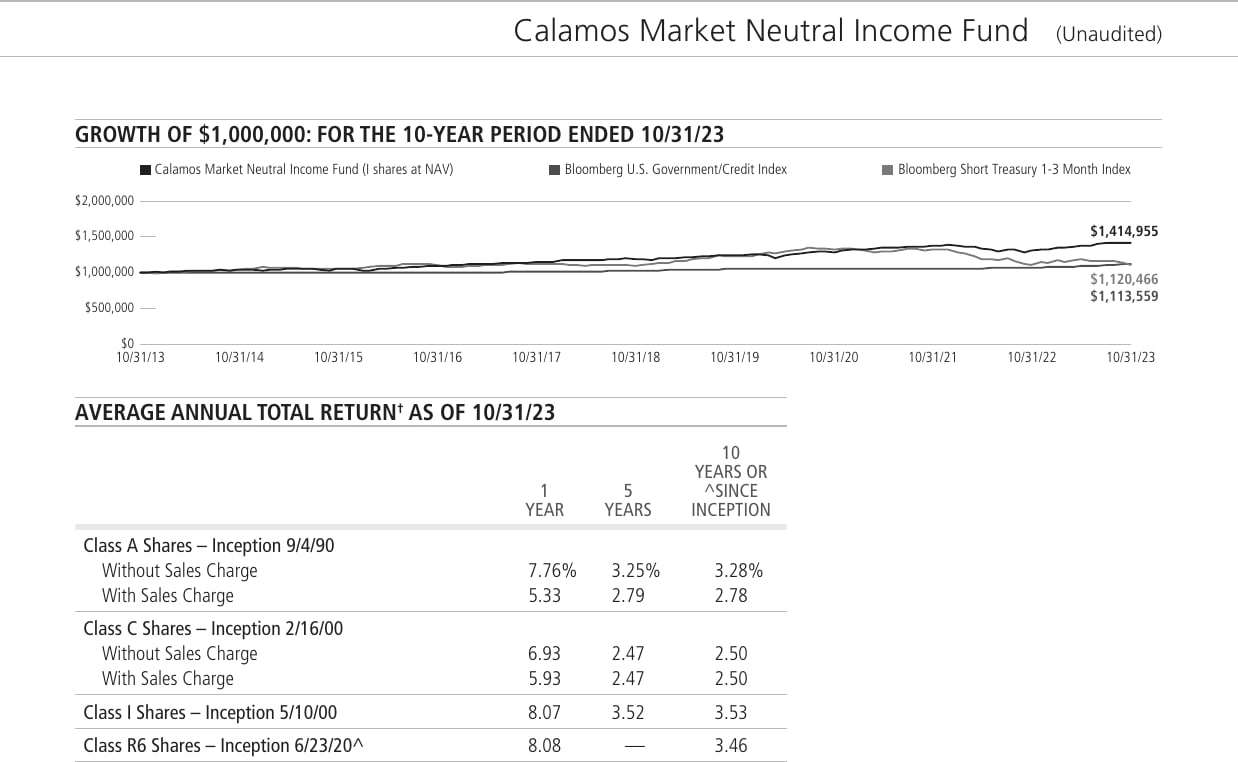
The mutual fund performance page below has a header, a growth-of-\$1,000,000 chart, and an average annual total return table broken out by share class. Extraction reads all of that and returns just the fields named in our schema, with a confidence score on every value. The rows of the returns table come back as structured objects of their own.
For this page we asked for the fund name, the returns as-of date, and every share-class row of the returns table. Here's what came back:
| Field | Extracted value | Confidence |
| -------------------- | ---------------------------------- | ---------- |
| `fund_name` | Calamos Market Neutral Income Fund | 99.5% |
| `returns_as_of_date` | 10/31/23 | 99.5% |
The four share-class rows came back inside the `share_classes` array, each as its own structured object with a confidence score on every value:
| Share class | Inception | 1-Year | 5-Year | 10-Year / Since Inception |
| --------------- | --------- | ------ | ------ | ------------------------- |
| Class A Shares | 9/4/90 | 7.76% | 3.25% | 3.28% |
| Class C Shares | 2/16/00 | 6.93 | 2.47 | 2.50 |
| Class I Shares | 5/10/00 | 8.07 | 3.52 | 3.53 |
| Class R6 Shares | 6/23/20 | 8.08 | — | 3.46 |
See the [Quickstart](/docs/document-processing/extraction/quickstart) to run an extraction end to end in Python, JavaScript, and cURL, or the [Schemas](/docs/document-processing/extraction/schemas) reference for the JSON Schema rules behind it.
## Defining a Schema
Extraction schemas follow the JSON Schema spec. The most important thing in the schema is the `description` you give each field. Keep descriptions as detailed and specific as possible. Clear, pointed descriptions help the model correctly locate and extract the intended information, especially in complex or ambiguous documents.
See the [Schemas](/docs/document-processing/extraction/schemas) reference for the rules, supported types, and worked examples.
## How Extraction Works
Once you submit a schema:
1. Unsiloed locates each named field in the document.
2. Extracts a value of the right type for each one.
3. Returns the values as structured JSON, each with a confidence score.
## Schema Tips
* Keep field names simple and descriptive.
* Use nested objects to reflect document structure.
* Avoid free-form schemas; strict schemas produce better results.
* Prefer arrays for repeated sections (line items, directors, transactions).
## Dig Deeper
JSON Schema rules, supported types, and worked examples for invoices and SEC filings.
The canonical extraction response with a field-by-field reference.
For the full request and response specification, see the [Extract API reference](/docs/api-reference/extraction/extract-data).