> ## Documentation Index
> Fetch the complete documentation index at: https://docs.unsiloed.ai/docs/llms.txt
> Use this file to discover all available pages before exploring further.
# Snowflake
> Set up Unsiloed in Snowflake: a UDF that extracts staged documents in SQL, plus a Cortex Agent that extracts them in natural language.
Snowflake can extract structured data from documents natively with
`AI_EXTRACT`. This guide routes that workload to Unsiloed by setting up two
pieces, in order:
1. **[A UDF](#extract-in-sql-with-a-udf)** that extracts documents from a
Snowflake stage in SQL. This is the foundation.
2. **[A Cortex Agent](#extract-with-a-cortex-agent)** that extracts those same
staged documents in natural language, by running the UDF through Snowflake's
Managed MCP server.
**Set up the UDF first.** Both paths stay inside Snowflake and run on that
same UDF.
## Why Call Unsiloed from Snowflake
Unsiloed adds schema-driven extraction with per-field confidence scores and
source citations, so you can route uncertain values to a review queue instead of
trusting every extracted value equally. Both pieces fit the Snowflake
architecture you already have and keep the API key in a Snowflake-managed
credential.
## Extract in SQL with a UDF
A Python user-defined function (UDF) over an
[External Access Integration](https://docs.snowflake.com/en/developer-guide/external-network-access/external-network-access-overview)
reads a staged file and sends it to Unsiloed's `/v2/extract`, returning typed
fields with confidence scores and citations. It works on any file in a stage.
For an internal stage, create the stage with
`ENCRYPTION = (TYPE = 'SNOWFLAKE_SSE')`. The UDF reads files through
`SnowflakeFile`, which can't open client-side-encrypted stages.
A ready-to-run setup (network rule, secret, integration, and the UDF) is in the
[Unsiloed cookbook](https://github.com/Unsiloed-AI/cookbook/tree/main/snowflake).
To install it:
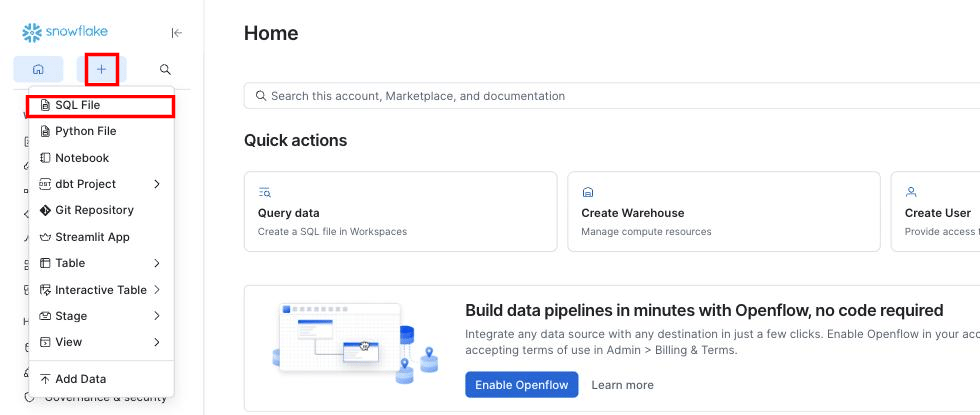
In Snowsight, select **+ (Create)** in the top left, then **SQL File**.
 Copy `setup.sql` from the cookbook into the worksheet. Set your database and
schema at the top, and paste your Unsiloed API key into the secret's
`SECRET_STRING`.
Open the **Run** dropdown next to the Run button and choose **Run All**. This
creates the network rule, secret, external access integration, and the
`unsiloed_extract` function.
Copy `setup.sql` from the cookbook into the worksheet. Set your database and
schema at the top, and paste your Unsiloed API key into the secret's
`SECRET_STRING`.
Open the **Run** dropdown next to the Run button and choose **Run All**. This
creates the network rule, secret, external access integration, and the
`unsiloed_extract` function.
 Then call the function with a scoped file URL, the file's name, and a JSON
Schema:
```sql theme={null}
SELECT unsiloed_extract(
BUILD_SCOPED_FILE_URL(@MY_DB.MY_SCHEMA.PDF_STAGE, 'invoice.pdf'),
'invoice.pdf',
'{ "type": "object", "properties": {
"vendor": { "type": "string" }, "total": { "type": "string" } } }'
) AS result;
```
Pass the name as well as the URL. Unsiloed decides how to decode the file from
its extension, and a scoped file URL is encrypted, so the UDF can't recover the
name from it.
Each field comes back as an object with a value, a confidence score, and a
citation:
```json theme={null}
{
"total": {
"value": "4.11",
"score": { "grounding_score": 0.998, "extraction_score": 0.989 },
"citation": {
"page": 1,
"bbox": [548, 142, 573, 156],
"page_width": 612.0,
"page_height": 792.0
}
}
}
```
The `bbox` array holds `[x0, y0, x1, y1]` in points, measured against the
`page_width` and `page_height` in the same object, so you can scale it to
whatever size you render the page at.
To process a whole stage in one query, join to `DIRECTORY(@stage)`, which gives
you `relative_path` for both the URL and the name:
```sql theme={null}
SELECT relative_path,
unsiloed_extract(
BUILD_SCOPED_FILE_URL(@MY_DB.MY_SCHEMA.PDF_STAGE, relative_path),
relative_path,
'{ "type": "object", "properties": { "total": { "type": "string" } } }'
) AS result
FROM DIRECTORY(@MY_DB.MY_SCHEMA.PDF_STAGE);
```
Unsiloed also accepts an array-of-objects schema, so repeating rows (line items,
holdings, table rows) need no columnar rewrite.
## Extract with a Cortex Agent
With the UDF in place, a Snowflake Cortex Agent (the engine behind Snowflake
CoWork) can extract your staged documents in natural language. The agent runs
the UDF through Snowflake's **Managed MCP server**: its `execute_sql` tool
lets the agent call `unsiloed_extract` on any file in your stage, so it reaches
documents inside Snowflake without a URL.
### Prerequisites for the Cortex Agent
* A Snowflake account with Cortex Agents and Snowflake CoWork available.
* A role that can create MCP servers and agents (`ACCOUNTADMIN` works).
* The `unsiloed_extract` UDF from the previous section.
### Set Up the Agent
Expose a read-only `execute_sql` tool through Snowflake's Managed MCP. The
server runs queries under your default warehouse, so make sure one is set
(`ALTER USER SET DEFAULT_WAREHOUSE = ''`).
```sql theme={null}
CREATE OR REPLACE MCP SERVER unsiloed_sql_mcp FROM SPECIFICATION $$
tools:
- name: "execute_sql"
type: "SYSTEM_EXECUTE_SQL"
title: "Execute SQL"
description: "Run read-only SQL, including the unsiloed_extract UDF"
$$;
```
Reference the Managed MCP server in a top-level `mcp_servers` block, and tell
the agent how to call the UDF. Fully-qualify `unsiloed_extract`, since
`execute_sql` runs without a database or schema context. The orchestration
model must be on the agent allowlist (for example `claude-sonnet-4-5`,
`claude-sonnet-5`, or `auto`).
```sql theme={null}
CREATE OR REPLACE AGENT invoice_agent FROM SPECIFICATION $$
{
"models": { "orchestration": "claude-sonnet-4-5" },
"instructions": {
"response": "You extract structured data from documents in Snowflake stages, then report each value with its confidence score.",
"orchestration": "When the user names a document in a stage, call execute_sql with SELECT MY_DB.MY_SCHEMA.unsiloed_extract(BUILD_SCOPED_FILE_URL(@MY_DB.MY_SCHEMA.PDF_STAGE, ''), '', ''), passing the same filename twice and building from the requested fields."
},
"mcp_servers": [
{ "server_spec": { "name": "MY_DB.MY_SCHEMA.unsiloed_sql_mcp" } }
]
}
$$;
```
### Use the Agent
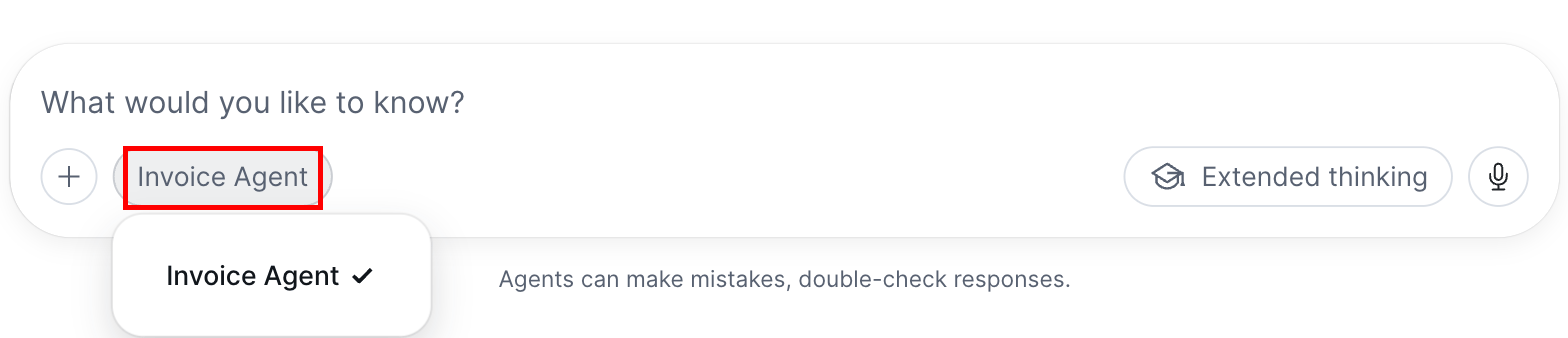
Open Snowflake CoWork at [ai.snowflake.com](https://ai.snowflake.com), start
a new chat, and pick your agent from the selector in the message box.
Then call the function with a scoped file URL, the file's name, and a JSON
Schema:
```sql theme={null}
SELECT unsiloed_extract(
BUILD_SCOPED_FILE_URL(@MY_DB.MY_SCHEMA.PDF_STAGE, 'invoice.pdf'),
'invoice.pdf',
'{ "type": "object", "properties": {
"vendor": { "type": "string" }, "total": { "type": "string" } } }'
) AS result;
```
Pass the name as well as the URL. Unsiloed decides how to decode the file from
its extension, and a scoped file URL is encrypted, so the UDF can't recover the
name from it.
Each field comes back as an object with a value, a confidence score, and a
citation:
```json theme={null}
{
"total": {
"value": "4.11",
"score": { "grounding_score": 0.998, "extraction_score": 0.989 },
"citation": {
"page": 1,
"bbox": [548, 142, 573, 156],
"page_width": 612.0,
"page_height": 792.0
}
}
}
```
The `bbox` array holds `[x0, y0, x1, y1]` in points, measured against the
`page_width` and `page_height` in the same object, so you can scale it to
whatever size you render the page at.
To process a whole stage in one query, join to `DIRECTORY(@stage)`, which gives
you `relative_path` for both the URL and the name:
```sql theme={null}
SELECT relative_path,
unsiloed_extract(
BUILD_SCOPED_FILE_URL(@MY_DB.MY_SCHEMA.PDF_STAGE, relative_path),
relative_path,
'{ "type": "object", "properties": { "total": { "type": "string" } } }'
) AS result
FROM DIRECTORY(@MY_DB.MY_SCHEMA.PDF_STAGE);
```
Unsiloed also accepts an array-of-objects schema, so repeating rows (line items,
holdings, table rows) need no columnar rewrite.
## Extract with a Cortex Agent
With the UDF in place, a Snowflake Cortex Agent (the engine behind Snowflake
CoWork) can extract your staged documents in natural language. The agent runs
the UDF through Snowflake's **Managed MCP server**: its `execute_sql` tool
lets the agent call `unsiloed_extract` on any file in your stage, so it reaches
documents inside Snowflake without a URL.
### Prerequisites for the Cortex Agent
* A Snowflake account with Cortex Agents and Snowflake CoWork available.
* A role that can create MCP servers and agents (`ACCOUNTADMIN` works).
* The `unsiloed_extract` UDF from the previous section.
### Set Up the Agent
Expose a read-only `execute_sql` tool through Snowflake's Managed MCP. The
server runs queries under your default warehouse, so make sure one is set
(`ALTER USER SET DEFAULT_WAREHOUSE = ''`).
```sql theme={null}
CREATE OR REPLACE MCP SERVER unsiloed_sql_mcp FROM SPECIFICATION $$
tools:
- name: "execute_sql"
type: "SYSTEM_EXECUTE_SQL"
title: "Execute SQL"
description: "Run read-only SQL, including the unsiloed_extract UDF"
$$;
```
Reference the Managed MCP server in a top-level `mcp_servers` block, and tell
the agent how to call the UDF. Fully-qualify `unsiloed_extract`, since
`execute_sql` runs without a database or schema context. The orchestration
model must be on the agent allowlist (for example `claude-sonnet-4-5`,
`claude-sonnet-5`, or `auto`).
```sql theme={null}
CREATE OR REPLACE AGENT invoice_agent FROM SPECIFICATION $$
{
"models": { "orchestration": "claude-sonnet-4-5" },
"instructions": {
"response": "You extract structured data from documents in Snowflake stages, then report each value with its confidence score.",
"orchestration": "When the user names a document in a stage, call execute_sql with SELECT MY_DB.MY_SCHEMA.unsiloed_extract(BUILD_SCOPED_FILE_URL(@MY_DB.MY_SCHEMA.PDF_STAGE, ''), '', ''), passing the same filename twice and building from the requested fields."
},
"mcp_servers": [
{ "server_spec": { "name": "MY_DB.MY_SCHEMA.unsiloed_sql_mcp" } }
]
}
$$;
```
### Use the Agent
Open Snowflake CoWork at [ai.snowflake.com](https://ai.snowflake.com), start
a new chat, and pick your agent from the selector in the message box.
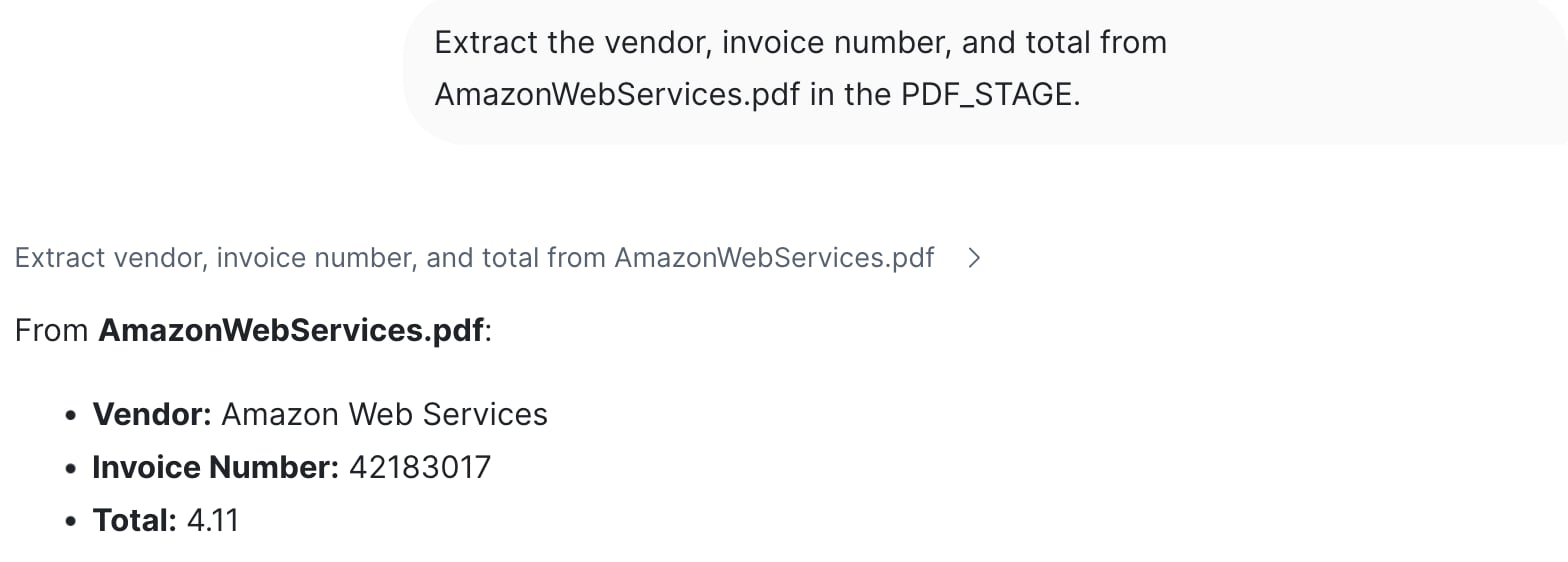
 Ask in natural language, naming a file in your stage:
```
Extract the vendor, invoice number, and total from AmazonWebServices.pdf
in the PDF_STAGE.
```
The agent runs the UDF through `execute_sql` and reports the fields, each
with a confidence score:
Ask in natural language, naming a file in your stage:
```
Extract the vendor, invoice number, and total from AmazonWebServices.pdf
in the PDF_STAGE.
```
The agent runs the UDF through `execute_sql` and reports the fields, each
with a confidence score:
 ## Troubleshoot the Cortex Agent
`execute_sql` runs without a database or schema context. Fully-qualify the
function in the agent's instructions: `MY_DB.MY_SCHEMA.unsiloed_extract(...)`.
Reference the MCP server in a top-level `mcp_servers` block, not under
`tools`/`tool_spec`. Also confirm the orchestration model is on the agent
allowlist (for example `claude-sonnet-4-5`, `claude-sonnet-5`, or `auto`;
`claude-4-sonnet` is not valid).
Make the orchestration instruction explicit: give the exact
`SELECT unsiloed_extract(BUILD_SCOPED_FILE_URL(@stage, ''), '', '')`
template and the stage name, so the agent maps the document name to a stage
path.
The agent dropped an argument, usually the file name. The function takes the
scoped URL, the file name, and the schema, so the filename appears twice in
the template. Restate it in the orchestration instruction.
The Managed MCP runs queries under your default warehouse. Set one with
`ALTER USER SET DEFAULT_WAREHOUSE = ''` and make sure it can
resume.
## See Also
Ready-to-run `setup.sql` for the in-SQL UDF path.
The `/v2/extract` endpoint, schema options, and response format.
## Troubleshoot the Cortex Agent
`execute_sql` runs without a database or schema context. Fully-qualify the
function in the agent's instructions: `MY_DB.MY_SCHEMA.unsiloed_extract(...)`.
Reference the MCP server in a top-level `mcp_servers` block, not under
`tools`/`tool_spec`. Also confirm the orchestration model is on the agent
allowlist (for example `claude-sonnet-4-5`, `claude-sonnet-5`, or `auto`;
`claude-4-sonnet` is not valid).
Make the orchestration instruction explicit: give the exact
`SELECT unsiloed_extract(BUILD_SCOPED_FILE_URL(@stage, ''), '', '')`
template and the stage name, so the agent maps the document name to a stage
path.
The agent dropped an argument, usually the file name. The function takes the
scoped URL, the file name, and the schema, so the filename appears twice in
the template. Restate it in the orchestration instruction.
The Managed MCP runs queries under your default warehouse. Set one with
`ALTER USER SET DEFAULT_WAREHOUSE = ''` and make sure it can
resume.
## See Also
Ready-to-run `setup.sql` for the in-SQL UDF path.
The `/v2/extract` endpoint, schema options, and response format.