

/v2/extract endpoint a JSON schema describing the fields you want, and the API returns them filled in with values.
Extraction is the right operation when you already know what matters: line items from an invoice, headline terms from a contract, fields from a lab report. Each value comes with a confidence score, so you can flag uncertain extractions for human review before they hit a database.
From Invoice to Typed Fields
The invoice below has a header, a billing block, a services table, and a totals block. Extraction reads all of that and returns just the fields named in our schema, with a confidence score on every value. The rows of the services table come back as structured objects of their own.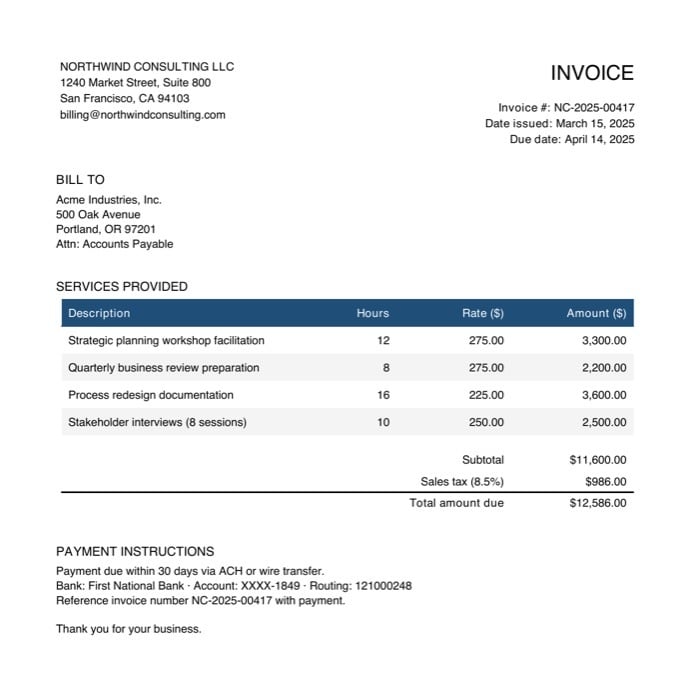
| Field | Extracted value | Confidence |
|---|---|---|
invoice_number | NC-2025-00417 | 97% |
invoice_date | March 15, 2025 | 98% |
vendor_name | NORTHWIND CONSULTING LLC | 95% |
customer_name | Acme Industries, Inc. | 95% |
total_amount_due | $12,586.00 | 97% |
line_items array, each as its own structured object with a confidence score on every value:
| Description | Hours | Rate | Amount |
|---|---|---|---|
| Strategic planning workshop facilitation | 12 | $275.00 | $3,300.00 |
| Quarterly business review preparation | 8 | $275.00 | $2,200.00 |
| Process redesign documentation | 16 | $225.00 | $3,600.00 |
| Stakeholder interviews (8 sessions) | 10 | $250.00 | $2,500.00 |
Defining a Schema
Extraction schemas follow the JSON Schema spec. The most important thing in the schema is thedescription you give each field. Keep descriptions as detailed and specific as possible. Clear, pointed descriptions help the model correctly locate and extract the intended information, especially in complex or ambiguous documents.
See the Schemas reference for the rules, supported types, and worked examples.
How Extraction Works
Once you submit a schema:- Unsiloed locates each named field in the document.
- Extracts a value of the right type for each one.
- Returns the values as structured JSON, each with a confidence score.
Schema Tips
- Keep field names simple and descriptive.
- Use nested objects to reflect document structure.
- Avoid free-form schemas; strict schemas produce better results.
- Prefer arrays for repeated sections (line items, directors, transactions).
Dig Deeper
Schemas
JSON Schema rules, supported types, and worked examples for invoices and SEC filings.
Response Format
The canonical extraction response with a field-by-field reference.